The route returned 200 formissing ids, so the clientnever showed an error.
Broken lines
Every line ends where your window ended. Paste into a prompt, a doc or Slack and the sentences arrive in pieces.
Unwrap fixes text you copy from Claude Code, Codex, the Claude and ChatGPT apps or any terminal: no broken lines, no stray symbols, no lost formatting. When it can, it pastes the exact markdown the agent wrote.
Download free. Activate with the $1 key from your purchase email.
⏺ Fixed the flaky test. The race was in waitForServer():⏎
  it polled the port before the listener was bound, so⏎
  a slow CI runner's first request hit nothing.······

  Changes:·······························
  • Await the listening event, don't poll the port⏎
  • Raise the CI timeout to 10 s··················

⎿ 2 files changed
⌘C
**Fixed the flaky test.** The race was in `waitForServer()`: it polled the port before the listener was bound, so a slow CI runner's first request hit nothing.
Changes:
- Await the `listening` event, don't poll the port
- Raise the CI timeout to 10 s
⏎ ·· where the terminal broke lines and padded them ** ` - the markdown Claude actually wrote
Terminals hand back a grid of characters, not the reply. Desktop apps hand back styled text that loses its markdown on the way to your editor.
Every line ends where your window ended. Paste into a prompt, a doc or Slack and the sentences arrive in pieces.
⏺, ⎿, box borders and trailing padding come along for the ride, and you delete them by hand, again.
Copy from the Claude, ChatGPT or Perplexity app and headings, lists and code blocks paste into your editor as plain lines.
Unwrap lives in your menu bar and fixes each copy the moment you make it.
Select text in any terminal or agent app and press ⌘C.
Claude Code and Codex save every reply on your Mac. Unwrap matches your copy to the reply it came from, in milliseconds.
Editors get markdown. Slack, Notion and Mail get proper formatting, with bold, lists and code intact.
No saved reply to match? Unwrap still joins the broken lines, removes the symbols and trims the padding.
Open the menu to see what changed. Switch between Formatted and Original, copy either one, or export it.
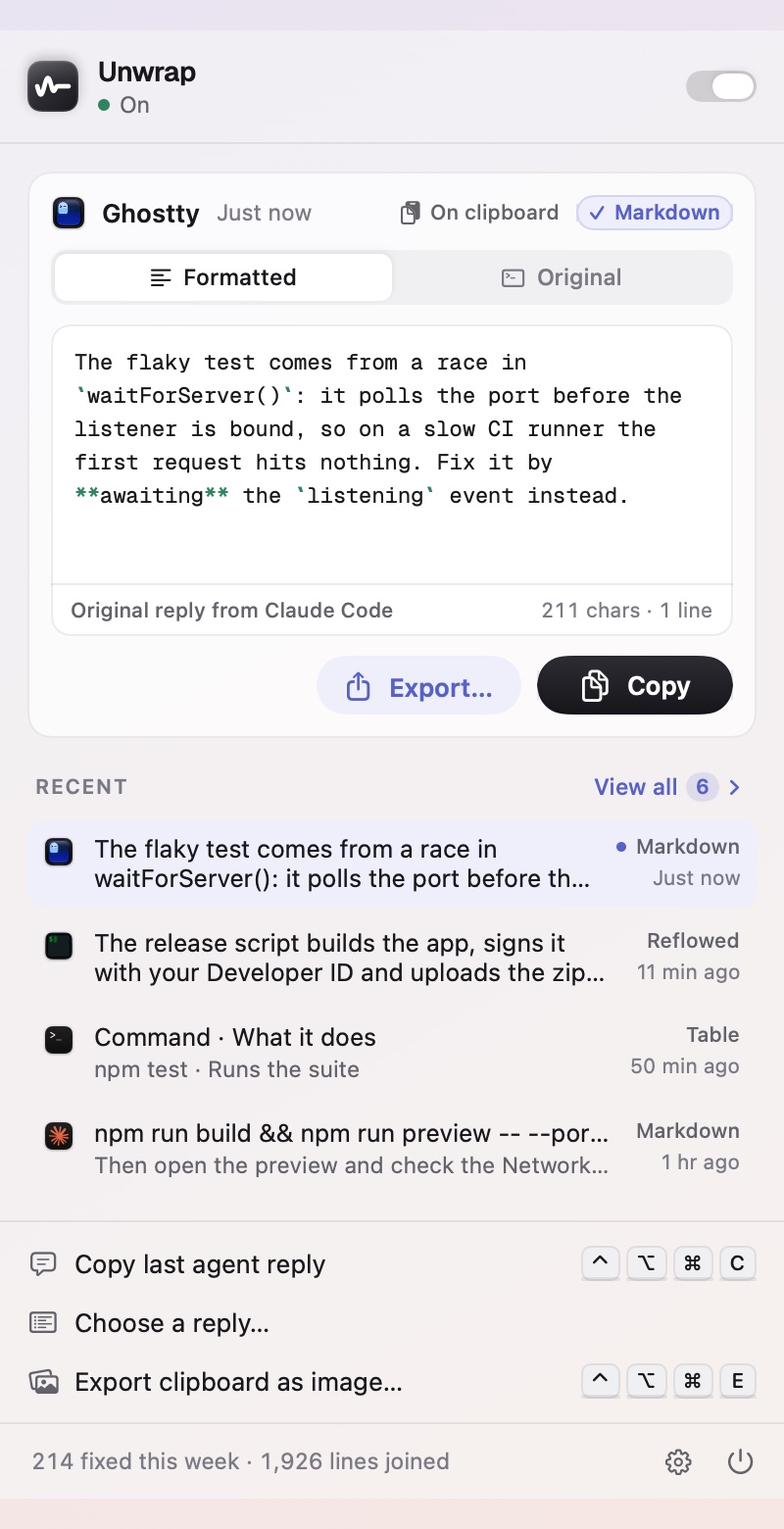
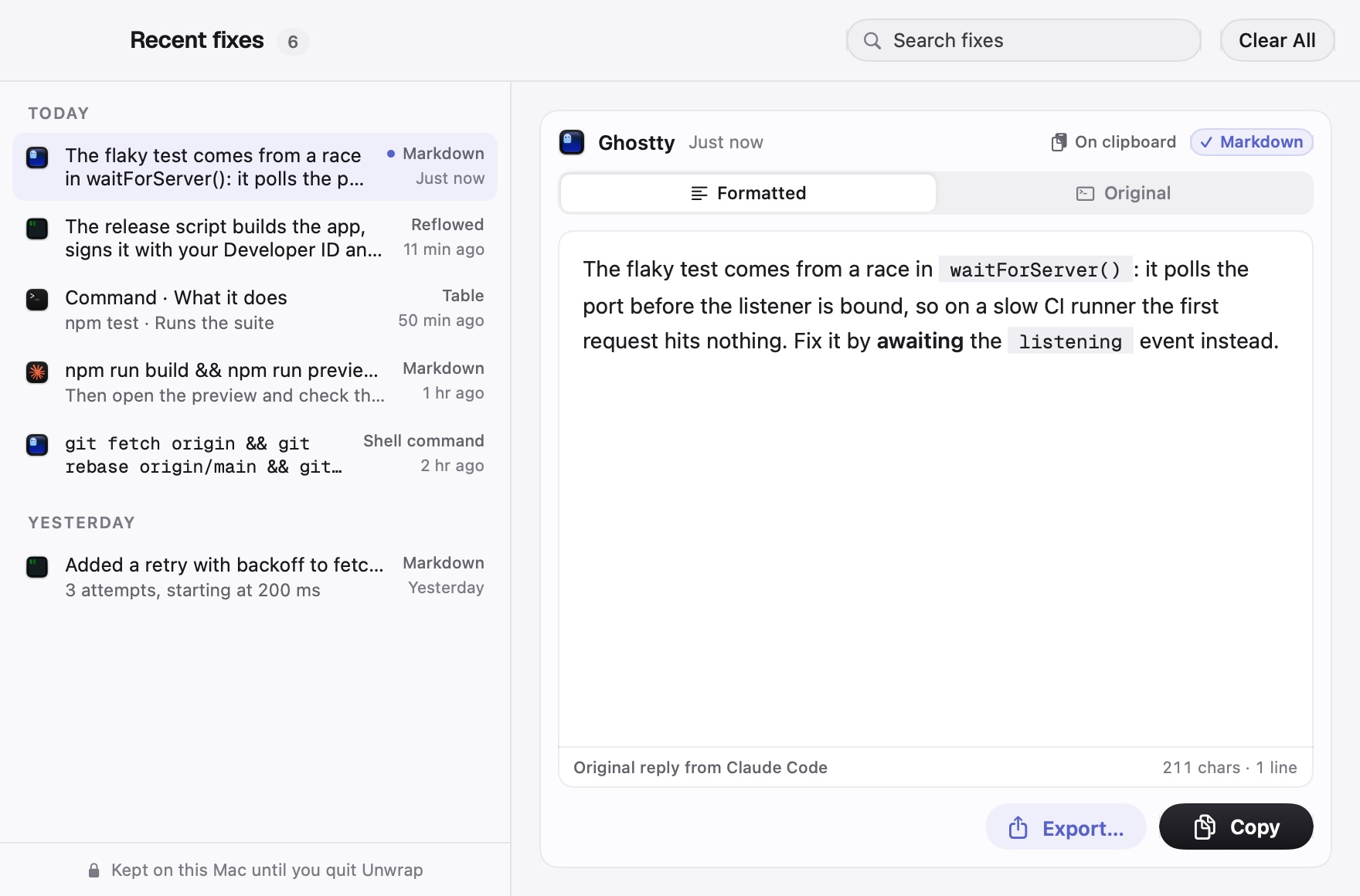
Press ⌃⌥⌘E on anything you copied, or click Export on a fix. Code is highlighted, Markdown is rendered, diffs are colored. Try the options:
A live preview drawn with the app's own frames and colors. PNG exports are 2x, sharp on any screen.
How much Unwrap can do depends on what each tool leaves on your Mac. Every one of them gets clean text.
These agents save every reply on your Mac. Unwrap finds the one your copy came from and pastes it word for word, formatting and all.
 >_Claude CodeIn any terminalClaude appCode tab
 ConductorMac app
No saved replies here, so Unwrap reads the copy's own formatting and turns it back into Markdown.
Claude appChat tab ChatGPTMac app
Broken lines joined, symbols and padding removed, links and tables repaired, in every terminal and in the terminals built into code editors.
 Terminal
 iTerm2
 Ghostty
 Warp
 VS Code
 Cursor
 Zed
App names and icons belong to their owners and are shown to say what Unwrap works with. Each source can be turned off in Settings.
Changed your mind? ⌥⇧⌘V pastes exactly what you copied.
Grab your agent's latest answer from any app with ⌃⌥⌘C, no selecting.
Box-drawn tables become markdown tables you can paste into docs.
URLs split across lines come back in one piece.
⌃⌘V fixes whatever is on your clipboard and pastes it, from any app.
Turn a copy into a Mac-window screenshot, a card, a PNG or a PDF with ⌃⌥⌘E.
Unwrap works entirely on your Mac. There's no account, no server and nothing to sync.
Copies from other apps are never changed.
Unwrap reads the session files Claude Code and Codex already keep on your Mac.
Anything your password manager marks as private is never read.
Checking for signed updates, and a weekly license check that sends only your key. Recent fixes live in memory and are gone when you quit.
Less than the time one broken paste costs you. Pay once, keep it.
Checkout by Dodo Payments. Your license key arrives by email; open Unwrap, paste it and click Activate.
$1, once. You get a license key for one Mac by email, and updates for Unwrap 1.x are included. No subscription, no account, no ads.
No, there's a refund instead. If Unwrap doesn't work for you within 14 days, email hello@mayankbuilds.com and you get your dollar back.
Open Unwrap › Settings › License on the old Mac and click Deactivate, then paste the same key on the new one. Lost your key? It's in your purchase email and in the customer portal.
No. Unwrap only acts on copies from terminals and agent apps. In code editors it only touches copies from the built-in terminal that look wrapped. Copies from your browser, documents or any other app are left alone, unless you press Paste Clean yourself.
/copy in Claude Code?/copy is great for a whole reply. Unwrap covers everything else: a paragraph you select with the mouse, a list, a command, in any agent and any terminal.
Click Undo on the confirmation, or press ⌥⇧⌘V to paste exactly what you copied. You can also pause Unwrap from its menu, or turn off any app in Settings.
Since macOS 15.4 an app has to ask before reading what other apps copied. Allow Unwrap in System Settings › Privacy & Security › Paste from Other Apps, or answer Allow when macOS asks.
Quit Unwrap from its menu and move it to the Trash. It leaves only its preferences behind.

Download free. Activate with the $1 key from your purchase email.
Signed and notarized by Apple. macOS 14 Sonoma or later, Apple silicon and Intel.